AI contact center software combines automation, analytics, and agent-assist capabilities to help support and sales teams handle customer interactions more efficiently across voice and digital channels. Done well, it reduces wait times, improves consistency, and gives agents the right information at the right moment. An omnichannel contact centers approach ensures these benefits extend across all channels for a seamless customer experience.
Evaluating AI contact center software pricing is an important step in planning adoption. Costs can vary depending on features like virtual agents, real-time agent assist, analytics, and workflow automation, as well as the number of users and interaction volumes. Understanding pricing helps organizations forecast total cost of ownership, scale AI capabilities effectively, and ensure that software investments translate into measurable improvements in both customer satisfaction and operational efficiency.
This guide breaks down what contact center ai software is, the most valuable features, where it delivers the biggest wins, and how to select and implement a platform that fits your operation. These capabilities demonstrate how ai contact center automation is transforming customer experience.
What is AI contact center software?
AI contact center software is a set of tools that uses techniques like natural language processing (NLP), machine learning, and automation to support customer service operations. It typically works inside (or alongside) a contact center platform and integrates with systems such as a CRM, knowledge base, order management, and ticketing tools.
Depending on the deployment, AI can help:
- Before an agent joins: self-service, automated routing, and context gathering
- During a conversation: real-time guidance, suggested responses, and knowledge retrieval
- After the interaction: summaries, disposition suggestions, and quality insights
These capabilities reflect the value of contact center ai services, creating intelligent workflows that support agents, streamline operations, and redefine customer support.
Top AI Contact Center Software Solutions
AI contact center software combines artificial intelligence, automation, and analytics to streamline operations, improve customer satisfaction, and reduce costs. These platforms enable businesses to automate routine tasks, assist live agents in real time, and deliver consistent, omnichannel support.
Here are some of the leading AI contact center software solutions:
1. Bright Pattern — Market-Leading AI Contact Center Software

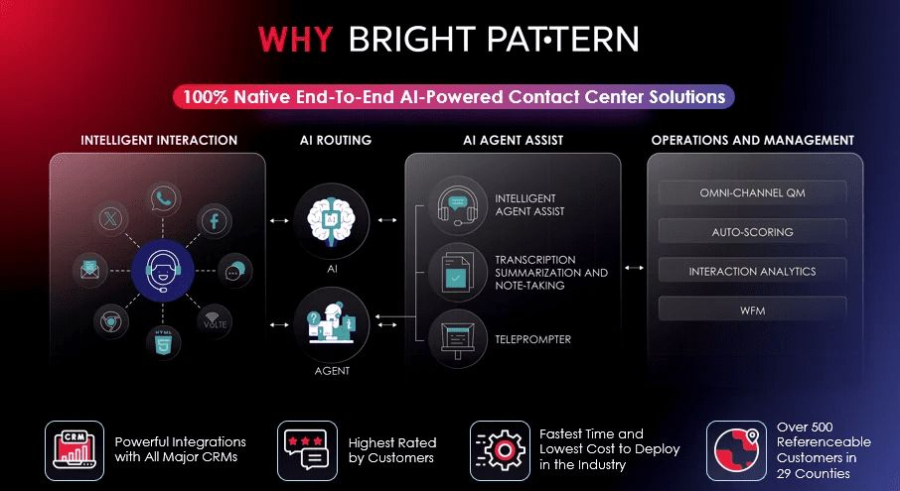
Bright Pattern offers a comprehensive AI contact center software suite designed for enterprises seeking commercial-grade automation, improved efficiency, and measurable ROI. Its platform is trusted by healthcare, finance, retail, and telecommunications companies to enhance customer service and reduce operational costs.
Commercial Features and Benefits:
- AI virtual agents handle high volumes of routine interactions such as FAQs, appointment scheduling, order tracking, billing inquiries, and basic troubleshooting. By automating these tasks, businesses can significantly reduce staffing costs.
- Intelligent routing ensures that customers are connected to the right agent based on skills, sentiment, interaction history, and predicted needs, improving first-contact resolution and reducing handle times.
- Omnichannel support allows customers to switch seamlessly between voice, chat, SMS, email, and messaging apps, ensuring consistent and convenient experiences.
- Real-time agent assist provides agents with suggested responses, knowledge articles, and next-best actions during live interactions, improving efficiency and accuracy.
- Workflow automation reduces manual processes like ticket creation, follow-ups, reminders, and notifications, freeing agents for higher-value interactions.
- Predictive analytics and reporting track trends, sentiment, and performance, helping managers optimize staffing, training, and service design.
- Integration services connect with CRM systems, workforce management tools, and marketing platforms, leveraging existing technology investments for smoother operations.
- Proactive engagement allows businesses to automatically notify customers of updates, delays, or promotions, reducing inbound calls and improving satisfaction.
- Scalability and security ensure enterprise-grade compliance and disaster recovery for businesses of any size.
- Measurable ROI: Companies using Bright Pattern report reductions in call handling times, increased customer satisfaction scores, and decreased operational costs thanks to AI-driven automation.
Bright Pattern positions itself as a commercially optimized solution, helping businesses maximize efficiency, reduce overhead, and deliver superior customer experiences while supporting complex enterprise requirements.
2. Genesys Cloud CX
Genesys Cloud CX provides AI-powered automation and analytics for intelligent routing, predictive engagement, and customer journey management. Businesses can scale operations efficiently while maintaining personalized support.
3. NICE CXone
NICE CXone combines AI automation with workforce optimization and real-time coaching. Its AI capabilities reduce handle times, improve agent performance, and enhance customer satisfaction.
4. Talkdesk AI Software
Talkdesk offers AI-driven virtual agents, workflow automation, and real-time agent assistance. Its software helps businesses scale support operations, improve resolution times, and optimize staffing resources.
5. Amazon Connect
Amazon Connect uses AI technologies like Amazon Lex and Contact Lens for virtual agent interactions, speech analytics, and sentiment detection. Its cloud-native platform enables scalable, automated contact center operations.
6. Zendesk AI Software
Zendesk automates ticket routing, conversational responses, and knowledge base suggestions, helping teams resolve customer inquiries faster and more accurately.
7. Microsoft Dynamics 365 Customer Service
Microsoft Dynamics 365 integrates AI with CRM tools to provide virtual agent responses, predictive case routing, and real-time guidance for agents, improving overall service efficiency.
8. Google Cloud Contact Center AI (CCAI)
Google CCAI delivers AI-powered virtual agents, real-time agent assistance, and sentiment analysis. Businesses can create customized workflows for automated support across channels.
9. Salesforce Service Cloud + Einstein AI
Salesforce Einstein enhances Service Cloud with AI-driven case routing, predictive recommendations, and automated workflows, helping agents resolve inquiries faster and more effectively.
10. Five9 AI Software
Five9 provides AI-powered virtual agents, smart IVR, and real-time agent assist, helping businesses automate routine interactions and optimize contact center performance.
Why teams adopt AI contact center software
Contact centers are measured on speed, quality, and cost. AI is attractive because it can improve all three at once when implemented thoughtfully.
- Faster resolution by surfacing answers and next-best actions during the conversation.
- Lower handle time through automated after-call work like summaries and tagging.
- Better customer experience with more consistent responses and shorter waits.
- Improved agent satisfaction because agents spend less time searching, typing, and repeating steps.
- More visibility into performance, sentiment, and contact drivers through automated analytics.
Core capabilities to look for
Not every platform uses “AI” the same way. The most effective AI contact center software tends to concentrate on practical, measurable capabilities.
1) Intelligent routing and triage
AI can route conversations based on intent, language, customer history, and predicted complexity. This helps the right customer reach the right agent sooner.
- Intent detection to categorize issues early
- Skills-based and priority routing
- Channel-aware routing (voice, chat, email, social)
2) Conversational self-service (virtual agents)
Virtual agents (chatbots and voice bots) can resolve common tasks such as order status, password resets, appointment scheduling, and simple troubleshooting. When a handoff is needed, a good system passes context to the agent to avoid customers repeating themselves.
- Multi-turn conversations for more than simple FAQs
- Secure workflows for identity checks and sensitive actions
- Seamless escalation with full transcript and customer context
3) Real-time agent assist
Agent assist tools help agents respond accurately and confidently while the interaction is happening.
- Suggested knowledge articles and snippets based on intent
- Next-best action recommendations (for example, steps in a troubleshooting flow)
- Real-time transcription for voice calls
- Compliance prompts and required disclosures
4) Automatic interaction summaries and wrap-up
After-call work is a major productivity drain. AI can generate summaries, propose dispositions, and draft follow-up messages so agents can move to the next interaction faster while maintaining quality.
- Structured summaries (issue, actions taken, outcome, next steps)
- Suggested tags and dispositions to support reporting
- Drafted emails or case notes for consistency
5) Quality management and conversation analytics
AI can analyze large volumes of interactions to uncover trends that manual review can miss.
- Topic and intent clustering to identify top contact drivers
- Sentiment and emotion signals (useful as directional insights)
- Automated quality scoring support (often with human review for governance)
- Coaching opportunities and script adherence signals
6) Workforce optimization support
While forecasting and scheduling are not always marketed as “AI,” modern platforms may use predictive methods to improve staffing plans.
- Forecasting based on historical volume and seasonality
- Intraday management insights
- Capacity planning and shrinkage-aware scheduling
Key benefits by role
AI contact center software pays off differently depending on who you are in the organization.
For customers
- Less time waiting thanks to better routing and effective self-service.
- Fewer repeats when context transfers across channels and agents.
- More consistent answers driven by curated knowledge and guided workflows.
For agents
- Less cognitive load with real-time suggestions and searchable knowledge.
- Reduced after-call work through automated summaries and logging.
- More confidence when compliance prompts and troubleshooting flows are built in.
For supervisors and QA
- Broader coverage by analyzing more interactions without relying only on sampling.
- Faster coaching loops using trend insights and targeted call examples.
- Clearer drivers of repeat contacts and escalations.
For operations and leadership
- Lower cost-to-serve by shifting suitable contacts to self-service and shortening handle time.
- Better scalability during peaks when automation absorbs routine demand.
- Improved reporting through standardized tagging and summaries.
Common use cases where AI shines
The best results usually come from targeting high-volume, well-defined interactions first, then expanding to more complex journeys.
High-volume customer support
- Order and delivery status
- Returns and exchanges
- Account updates
- Billing questions and invoice copies
Technical support and troubleshooting
- Guided step-by-step diagnostic flows
- Knowledge article recommendations based on symptoms
- Escalation criteria based on detected complexity
Sales and retention support
- Lead qualification via chat
- Suggested cross-sell or upsell prompts based on context
- Retention offers surfaced to agents using rules and predictive signals
Back-office enablement
- Case summarization for faster handoffs
- Auto-tagging and categorization for better queue management
- Knowledge base gap detection based on repeated questions
What “good” looks like: measurable outcomes to track
AI value is easiest to defend when you define success metrics before rollout. The exact impact varies by industry, volume, and process maturity, but the following KPIs are commonly used to measure improvement.
- Average handle time (AHT) and after-call work (ACW)
- First contact resolution (FCR) and repeat contact rate
- Containment rate for self-service (and escalation quality)
- Customer satisfaction signals (for example, CSAT) and complaint rate
- Transfer rate and misroute rate
- Time to proficiency for new agents
- QA coverage and speed of coaching cycles
Feature checklist: what to prioritize when evaluating platforms
Use this as a practical shopping list. It focuses on capabilities that typically drive adoption and results.
Data and integrations
- CRM integration for customer context
- Knowledge base integration (and easy content governance)
- Ticketing and case management connectivity
- APIs and webhooks for workflow automation
AI experience quality
- Accurate transcription for your languages and audio conditions
- Configurable agent assist prompts (not just generic suggestions)
- Human-in-the-loop controls for QA and content accuracy
- Clear handling of edge cases and safe escalation
Security and governance
- Role-based access controls
- Audit logs and administrative transparency
- Data retention controls suitable for your compliance needs
- Support for redaction of sensitive data in transcripts and logs
Operations and manageability
- Analytics dashboards that map to your KPIs
- Easy workflow design for common journeys (returns, cancellations, billing)
- Quality management tools integrated with conversation insights
- Support for omnichannel routing and consistent reporting
AI contact center software capabilities at a glance
| Capability | What it does | Best for | What to verify during evaluation |
|---|---|---|---|
| Virtual agent (chat or voice) | Automates routine requests and gathers info before escalation | High-volume, repeatable tasks | Containment quality, handoff context, fallback behavior |
| Intelligent routing | Directs contacts to the best agent or queue using intent and attributes | Reducing transfers and wait times | Misroute rate, customization options, reporting clarity |
| Agent assist | Suggests knowledge, responses, and next steps in real time | Complex inquiries and new agent support | Relevance of suggestions, speed, and ease of adoption |
| Auto-summaries and wrap-up | Creates interaction summaries, tags, and drafts follow-ups | Lowering ACW and improving documentation | Accuracy, editability, and consistency with QA standards |
| Conversation analytics | Finds trends, contact drivers, and emerging issues | Continuous improvement and VOC programs | Explainability, filtering, and alignment to business taxonomy |
| Quality insights | Helps score interactions and identify coaching moments | Scaling QA beyond sampling | Governance controls, reviewer workflow, and bias safeguards |
Implementation approach that drives adoption
Successful rollouts typically prioritize process clarity and change management as much as the technology itself. Here is a practical sequence many teams follow.
Step 1: Choose the first use case based on volume and clarity
Pick a journey with consistent steps and a clear definition of success, such as “Where is my order?” or “Reset my password.” This makes training data, knowledge content, and measurement far easier.
Step 2: Standardize knowledge and workflows
AI agent assist and self-service are only as strong as the information they can rely on. Consolidate key articles, remove duplicates, and define a single source of truth for policies and procedures.
Step 3: Pilot with a small cohort and tight feedback loops
Start with a subset of agents or a single queue. Collect feedback on suggestion relevance, summary quality, and escalation behavior, then iterate quickly.
Step 4: Expand with guardrails
As you widen deployment, keep controls that maintain quality.
- Require agent review of AI-generated summaries where appropriate
- Use approved knowledge sources for suggested answers
- Monitor misroutes, escalations, and repeat contacts
Step 5: Operationalize continuous improvement
Once the basics are working, AI insights can become a continuous improvement engine. Review top intents, update knowledge content, and tune routing rules based on real contact drivers.
Success patterns: what high-performing teams do differently
While results vary, strong outcomes tend to follow a few consistent patterns that you can replicate.
They start with agent experience, not just automation
Many teams see quick wins by reducing agent friction first: faster search, better knowledge suggestions, and streamlined wrap-up. This builds trust and makes later self-service expansion smoother.
They measure containment alongside customer outcomes
Containment is helpful, but it should not come at the expense of customer satisfaction. High-performing teams track both containment and escalation quality, ensuring handoffs stay seamless and customers feel heard.
They treat knowledge as a product
Teams that assign clear ownership for knowledge content, approvals, and lifecycle management tend to see stronger AI performance over time. Fresh, accurate content is a compounding advantage.
They use analytics to reduce contact drivers
Conversation analytics often reveals patterns such as confusing checkout steps, unclear billing descriptions, or product issues. Fixing the underlying cause can reduce overall volume and improve customer trust.
How to choose the right AI contact center software for your business
Use these questions to guide demos and trials and to avoid buying features that look impressive but do not translate into measurable outcomes.
1) Does it fit your channels and customer expectations?
- Do you need voice, chat, email, messaging apps, or all of the above?
- Can the platform keep context across channels for a single customer journey?
2) How well does it integrate with your current stack?
- Can it pull customer details, order history, and case history in real time?
- Can it write back summaries and outcomes in a structured way?
3) Can your team configure and govern it?
- How easy is it to update knowledge, intents, and workflows?
- Are there clear controls for approvals, auditing, and role-based access?
4) Is the AI transparent enough for operational trust?
- Can supervisors understand why a contact was routed a certain way?
- Are suggestions and summaries editable and traceable?
5) Does reporting align with your KPIs?
- Can you measure AHT, ACW, FCR, containment, and escalation quality?
- Can you break down performance by queue, intent, and channel?
Frequently asked questions
Is AI contact center software only for large enterprises?
No. Smaller teams can benefit significantly, especially from agent assist, automated summaries, and improved routing. The key is to start with a focused use case and expand as value becomes clear.
Will AI replace human agents?
In most real-world contact centers, AI is used to augment agents and handle routine tasks, while humans focus on complex, sensitive, or high-value interactions. The strongest outcomes typically come from combining automation with human judgment.
What is the difference between a contact center platform and AI contact center software?
A contact center platform provides core functions like telephony, omnichannel routing, and agent desktops. AI contact center software adds intelligence and automation, such as virtual agents, agent assist, conversation analytics, and automated wrap-up. In many cases, AI features are built into modern platforms or delivered as integrated add-ons.
How quickly can you see results?
Time-to-value depends on integration complexity and how ready your knowledge and workflows are. Many teams prioritize use cases that can be launched in phases so improvements in wrap-up time, routing, or self-service can be tracked early and optimized over time.
Takeaway: AI contact center software is a growth lever for CX and efficiency
AI contact center software is most effective when it is treated as an operational improvement program, not just a tool purchase. With the right foundation in knowledge, integrations, and governance, it can help you serve customers faster, support agents better, and turn conversation data into continuous improvement that compounds over time.
If you are evaluating options, start by prioritizing one high-volume journey, define the KPIs you will improve, and select a platform that makes it easy to iterate. That is how AI becomes a reliable advantage, not a one-time experiment.
